
티스토리 뷰
데이터 분석은 다양한 분야에서 중요한 역할을 하며, 특히 의료 분야에서 질병 예측과 예방에 큰 기여를 합니다. 이 글에서는 데이터 분석의 주요 과정과 웹 크롤링을 활용한 데이터 수집 기법을 소개하며, 의료 데이터를 예시로 사용하여 설명하겠습니다.
1. 의료 데이터 분석 개요
1.1 의료 데이터의 특징
- 결측치가 많을 가능성이 높음 → 적절한 전처리 필요
- 개인 정보 포함 가능 → 보안 및 익명화 처리 필요
- 수치 데이터와 범주형 데이터 혼재 → 분석 방법이 다름
1.2 분석 목표
- 데이터 전처리를 수행하여 이상값 및 결측치 처리
- 데이터 시각화를 통해 심부전과 관련된 패턴 탐색
- 특정 변수 간의 관계 분석을 통한 인사이트 도출
2. 데이터 탐색 및 전처리
2.1 데이터 로드 및 구조 확인
import pandas as pd
import numpy as np

# 데이터 불러오기
heart = pd.read_csv("heart.csv")

# 데이터 구조 확인
print(heart.info())
print(heart.head())
2.2 결측치 확인 및 처리
의료 데이터에서는 결측치 처리가 중요합니다.
for col in heart.columns:
    missing_rate = heart[col].isna().sum() / len(heart) * 100
    if missing_rate > 0:
        print(f"{col} 결측치 비율: {round(missing_rate, 2)}%")
- 결측치 비율이 5% 미만 → 삭제 가능
- 5~20% → 평균, 중앙값으로 대체
- 20% 이상 → 해당 변수 제거 또는 예측 모델을 사용한 보완
결측치 처리 예제
heart['FastingBS'].fillna(0, inplace=True)
heart['RestingBP'].fillna(heart['RestingBP'].median(), inplace=True)
heart.dropna(inplace=True)  # 남은 결측치 행 삭제
3. 데이터 시각화 및 분석
3.1 막대 그래프 (Countplot)
import seaborn as sns
import matplotlib.pyplot as plt

plt.figure(figsize=(12, 5))
sns.countplot(data=heart, x='HeartDisease', hue='ChestPainType', hue_order=["ASY", "NAP", "ATA", "TA"],
              palette=['#003399', '#0099FF', '#00FFFF', '#CCFFFF'])
plt.xticks([0,1], [For individuals without heart disease', 'For individuals with heart disease'])
plt.title('Chest Pain Types Based on Presence of Heart Disease')
plt.show()
3.2 영역 그래프 (Fill Between)
Heart_Age = heart.groupby('Age')['HeartDisease'].value_counts().unstack()
plt.figure(figsize=(15,5))
plt.fill_between(Heart_Age.index, Heart_Age[0], color='#003399', alpha=1, label='Normal')
plt.fill_between(Heart_Age.index, Heart_Age[1], color='#0099FF', alpha=0.6, label='Heart Disease')
plt.xlabel('Age')
plt.ylabel('Count')
plt.legend()
plt.title('Age Distribution Based on Heart Disease')
plt.show()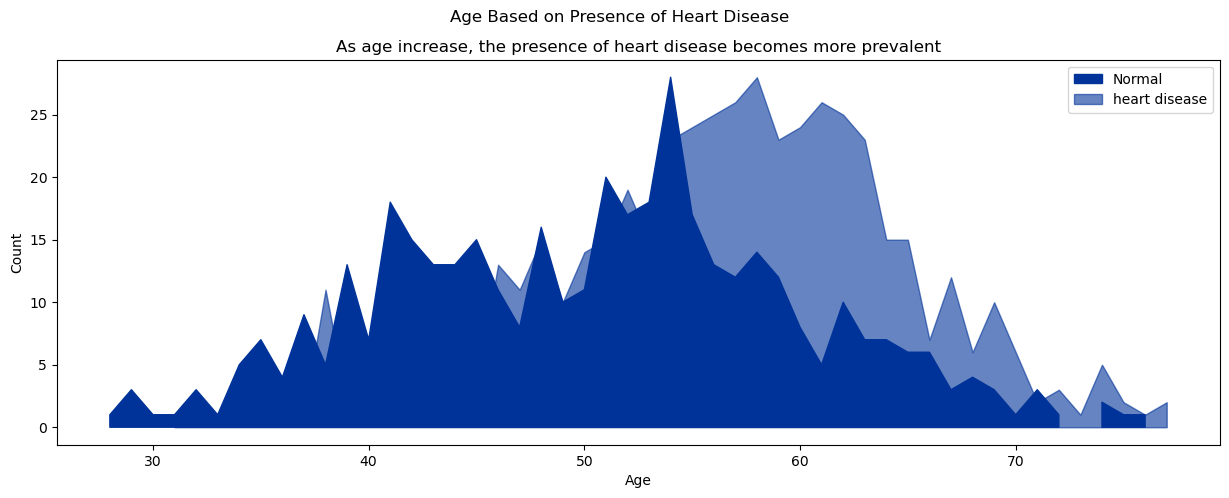
3.3 산점도 그래프 (Swarmplot)
H_0 = heart[heart['HeartDisease'] == 0]
H_1 = heart[heart['HeartDisease'] == 1]
fig = plt.figure(figsize = (15,5))
ax1 = fig.add_subplot(1,2,1)
ax2 = fig.add_subplot(1,2,2)
# H_0에서 Age별 RestingBP 수치에 따른 ExerciseAngina 여부
sns.swarmplot(x = 'RestingECG',
              y = 'Age',
              data= H_0,
              ax = ax1,
              hue = 'ExerciseAngina',
              palette=['#003399', '#0099FF'],
              hue_order = ['Y', 'N']
              )

# H_1에서 Age별 RestingBP 수치에 따른 ExerciseAngina 여부
sns.swarmplot(x = 'RestingECG',
              y = 'Age',
              data= H_1,
              ax = ax2,
              hue = 'ExerciseAngina',
              palette=['#003399', '#0099FF'],
              hue_order = ['Y', 'N']
              )
ax1.set_title('Without heart disease')
ax2.set_title('With heart disease')
plt.show()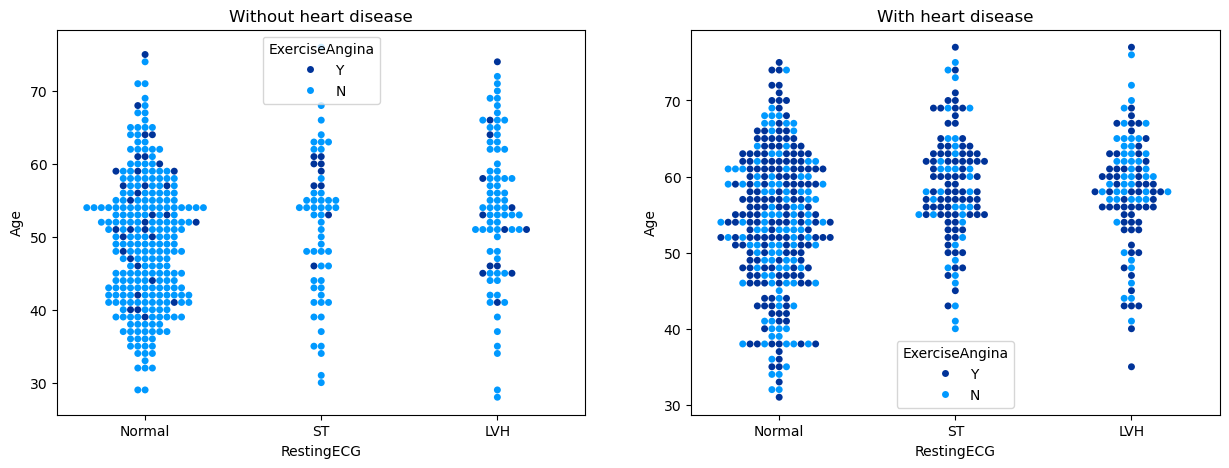
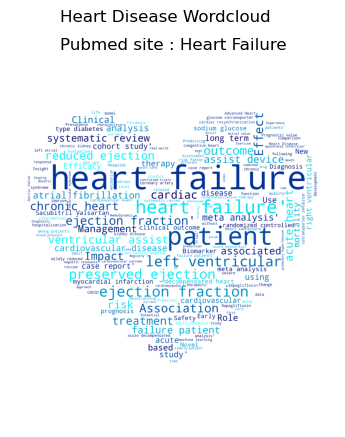
3.4 워드 클라우드
from wordcloud import WordCloud
from PIL import Image

text = ' '.join(heart.columns)
wordcloud = WordCloud(width=800, height=400, background_color='white', colormap='coolwarm').generate(text)

plt.figure(figsize=(10, 5))
plt.imshow(wordcloud, interpolation='bilinear')
plt.axis('off')
plt.title('Heart Disease Related Keywords')
plt.show()
4. 웹 크롤링을 활용한 데이터 수집
4.1 웹 크롤링 개요
웹 크롤링(Web Crawling)은 웹사이트에서 데이터를 자동으로 수집하는 기술입니다. 대표적인 라이브러리로 BeautifulSoup과 Requests를 사용합니다.
4.2 BeautifulSoup을 활용한 HTML 데이터 파싱
import requests
from bs4 import BeautifulSoup

# 웹 페이지 요청
url = "https://finance.yahoo.com/quote/005930.KS/history/"
headers = {
    'User-Agent': 'Mozilla/5.0'
}
response = requests.get(url, headers=headers)
soup = BeautifulSoup(response.text, 'html.parser')
4.3 특정 태그의 데이터 추출
# 모든 테이블 행(tr) 가져오기
rows = soup.find_all('tr')
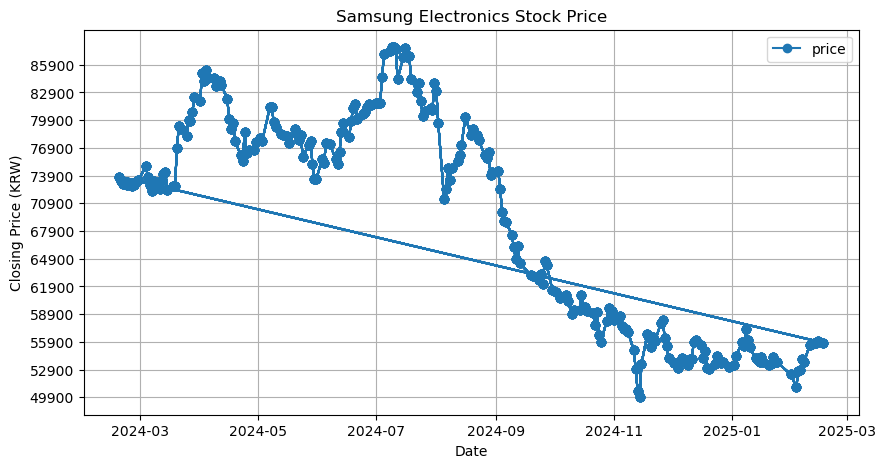
4.4 웹 데이터 분석 및 시각화
plt.figure(figsize=(10, 5))
plt.plot(stock_df['Date'], stock_df['Close Price'], marker='o')
plt.xlabel('Date')
plt.ylabel('Closing Price (KRW)')
plt.title('Samsung Electronics Stock Price')
plt.grid(True)
plt.show()
5. 결론 및 인사이트
이번 분석을 통해 심부전 데이터 분석 및 웹 크롤링 기법을 활용하여 데이터를 수집하고 시각화하는 방법을 살펴보았습니다.
✅ 핵심 인사이트
- 심부전 환자는 연령이 높을수록 위험성이 증가하는 경향
- 무증상(ASY) 흉통 유형이 심부전 환자에서 가장 많이 나타남 → 조기 진단 필요
- 웹 크롤링을 활용하면 최신 데이터를 실시간으로 수집할 수 있음
- 주가 데이터를 활용한 금융 데이터 분석도 가능
웹 크롤링을 통해 지속적으로 데이터를 업데이트하고, 의료 및 금융 데이터 분석에 활용할 수 있습니다.
'LG U+ Why Not SW 부트캠프 5기' 카테고리의 다른 글
| 웹 스크래핑과 유튜브 데이터 분석을 활용한 데이터 수집 및 시각화 (0) | 2025.02.18 |
|---|---|
| 한글을 표기하기 위한 글꼴 변경(윈도우, macOS에 대해 각각 처리) (0) | 2025.02.18 |
| 데이터 분석의 핵심 개념과 실전 활용 (1) | 2025.02.14 |
| Python 기초 개념 총정리: 필수 문법과 실전 활용 (0) | 2025.02.11 |
| Pandas를 활용한 데이터 분석: 기본 개념부터 실전 활용까지 (0) | 2025.02.05 |